


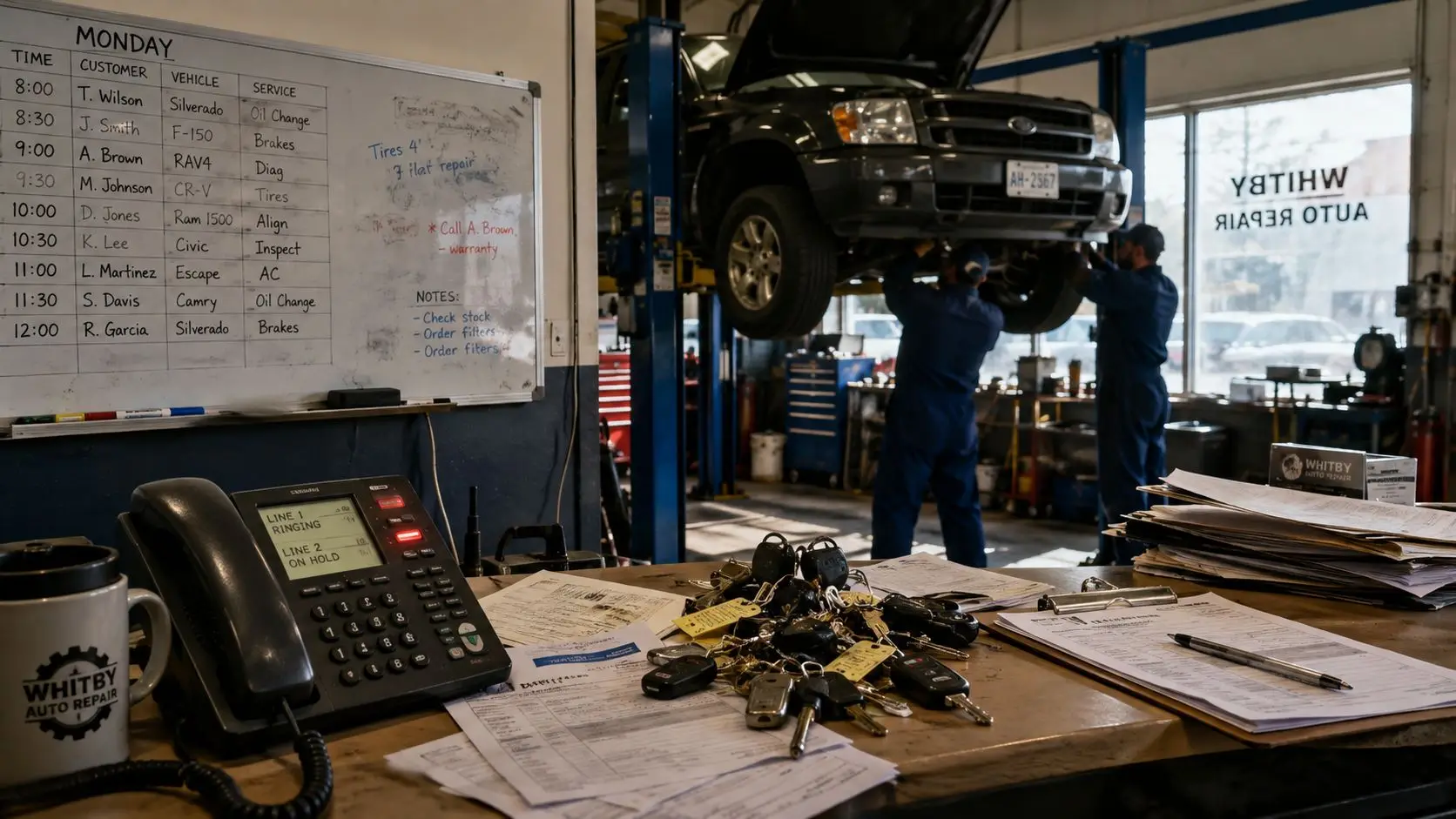
Monday morning in a Whitby shop can go sideways fast. The whiteboard's half-erased, two techs are already on different jobs, a customer is waiting on a callback, and the third phone line has rung twice with nobody picking up. That's not a staffing problem. It's a scheduling problem, and if you're still running bookings by memory, paper, and sticky notes, you're leaking money every day.
An automated scheduling system isn't a software toy you buy because the demo looked clean. It's an operations overhaul that decides whether your bays stay full, your advisors stay sane, and your technicians get work they can finish on time. In a real service shop, the difference between manual and automated scheduling shows up in customer trust, bay utilisation, and how many times your team has to rescue the day with a last-minute shuffle.
The shift is already happening in North American service businesses. Research cited in 2025 found that 59% of managers spend three or more hours every week on scheduling tasks, and 39% still rely on paper or basic software to build rosters, which means manual scheduling is still the norm for a lot of shops that think they're “pretty organised” (yourco.io research summary). If you want a broader look at how booking and dispatch logic changes across operations, the transport management system guide is worth reading because the same coordination problem shows up there in another form.
Carmedics Autowerks Inc also keeps a useful fleet maintenance schedule in the same operational lane, because once jobs are being booked properly, the next battle is keeping repeat work predictable.
The shops that win with automation usually get three things right. They recover missed calls into booked jobs, they cut no-shows with reminders, and they stop wasting technician time on bad slotting. If you're trying to decide whether this is worth the switch, those are the only outcomes that matter.
Why Your Shop Needs an Automated Scheduling System
A Whitby shop owner staring at a whiteboard at 7 a.m. already knows the problem. One bay is blocked by a job that ran long yesterday, a technician called in with a family issue, and the first customer of the day wants to know whether the car will be ready before lunch. Manual scheduling looks cheap until you count the cost of missed calls, idle bays, and the promises you have to retract later.
An automated scheduling system fixes that by turning scheduling into an operations workflow, not a calendar cleanup task. The job is constraint modelling, matching the repair type to the right technician, the right bay, and a handoff time you can keep. That matters because every missed call and every slow follow-up is a job that can walk to another shop.
What manual scheduling actually costs
The old system fails in three predictable ways. First, advisors burn time juggling call-backs, paper diaries, and technician availability. Second, double-bookings and vague handovers damage trust because customers remember the promise more than the excuse.
Third, the work gets slotted badly. A job that needs a certified technician sits waiting while a simpler repair takes a prime bay, and the whole day loses money. That is not a small inconvenience. It is margin leakage.
Practical rule: If a booking depends on one person remembering three different constraints, the system is already too fragile.
The case for automation is simple, keep the bays filled, keep the work moving, and keep customers informed. That is why a transport management system guide is worth a look, because the same coordination problem shows up in another operation that lives and dies by dispatch accuracy. Shops that still run repeat work off paper feel the pain twice, once in admin time and again when the day falls out of sequence.
Carmedics Autowerks fleet maintenance schedule belongs in the same operational lane, because once jobs are booked properly, repeat work has to stay predictable too.
The shops that win with automation usually get three things right. They recover missed calls into booked jobs. They cut no-shows with reminders. They stop wasting technician time on bad slotting. If you want more work through the door, those are the outcomes that matter.
Calculating ROI Before You Commit
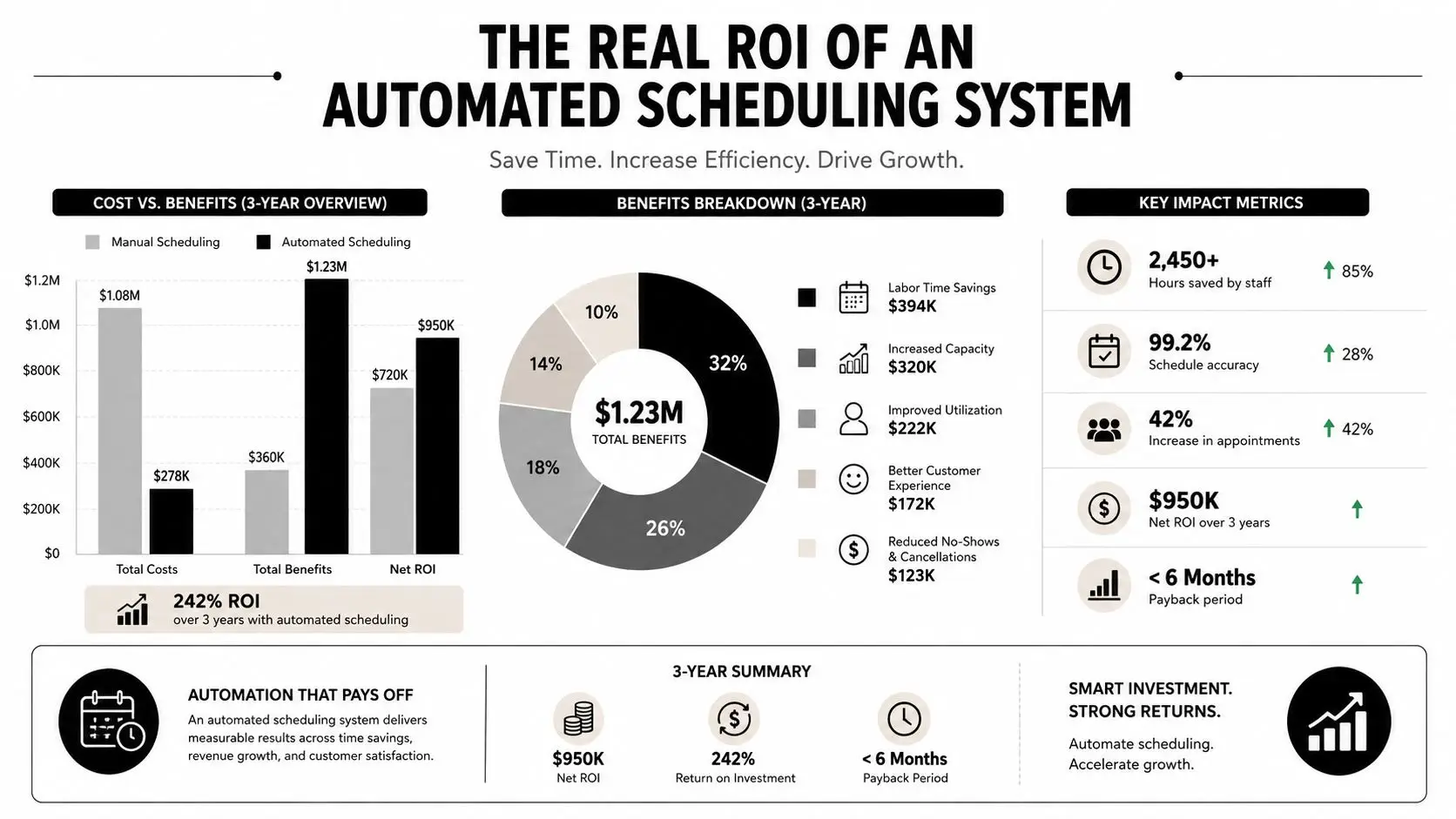
A shop owner I know used to lose bookings every time the front desk got busy. Calls rolled to voicemail, callbacks came late, and by the time someone returned the message, the customer had already booked somewhere else. That is the kind of leak an automated scheduling system should close, and the return shows up in lost revenue recovered, not in a shiny software demo.
Where the return shows up
Start with the calendar itself. If a customer can book after hours, during lunch, or while waiting in a parking lot with a warning light on, you are turning missed demand into scheduled work. That matters because the booking happens while the customer still wants the slot.
Then look at the jobs that never show. Automated confirmations and reminders reduce the number of empty bays sitting on the clock. They also push rescheduling earlier, which gives the shop a chance to refill the opening instead of eating dead time and losing a technician hour.
Bay and technician utilisation is the third place where the math changes. A schedule that matches job class, technician skill, and available capacity keeps more of the day productive, and that is where the system earns its keep. A peer-reviewed paper from the University of Michigan study in peer-reviewed paper showed that automation can cut schedule creation time and improve schedule quality, and that kind of gain matters in a shop that cannot afford manual rework.
How to model payback before you sign
Use a plain payback exercise, not a vendor calculator. List the missed calls that become lost bookings, the no-shows your team absorbs, and the overtime you pay when the day gets scrambled. Then ask one question, how much of that pain does the new system remove?
If you cannot connect the software to missed-call, no-show, and overtime costs, you are guessing.
The hidden return is time. Every hour the service advisor stops spending on manual schedule cleanup is an hour that can go to booked jobs, approval calls, and customer updates. The system does not just save labor, it changes how much work the front desk can push through in a day.
The hard part is the constraint model. If availability data is stale, technician skills are wrong, or job durations are unrealistic, the schedule will look polished and still fail in the shop. Before you buy, treat ROI as a test of operational honesty. If the model reflects how your bays work, the numbers will hold up.
Must-Have Features for Auto Shop Scheduling
A lot of vendor demos are just prettier calendars. That's useless if the shop can't model what constrains the day. The first thing to define is hard constraints, things the system must never violate, and soft constraints, things it should prefer but can bend when needed.
For an auto repair shop, the hard list is short and essential: bay capacity, technician certification, job class, and promised pickup time. Soft rules come after that, such as first-come-first-served ordering or fairness across technicians. SAP's field-service guidance describes automated scheduling as a trigger-and-data-collection flow followed by optimisation, candidate generation, filtering invalid assignments, and selecting the best valid schedule (SAP field-service scheduling documentation). That's the right mental model for a shop, not a calendar with extra buttons.
Feature checklist for shop scheduling platforms
| Feature | Why It Matters | Priority |
|---|---|---|
| Two-way SMS and email confirmations | Cuts no-shows and lets customers reschedule before the slot is dead | High |
| Real-time bay and lift capacity tracking | Prevents overbooking and protects turnaround promises | High |
| Technician skill and certification matching | Stops the system from assigning work to the wrong person | High |
| Job-class duration estimates | Keeps day planning realistic instead of optimistic | High |
| Parts and supplies dependency flags | Avoids scheduling jobs that can't move until parts are in hand | High |
| Deposit or card-on-file holds | Reduces junk bookings and improves commitment | Medium |
| CRM, accounting, and parts integration | Stops staff from retyping the same job data three times | High |
The part shops ignore most often is dependency logic. A job might be bookable in theory and impossible in practice because the parts aren't in yet or the bay needs a specific setup. That's why the parts inventory management angle matters, scheduling and parts control need to speak to each other or you end up with elegant nonsense.
What looks good in demos but doesn't move the needle
Glossy booking pages are nice, but they don't fix capacity planning. Colourful customer portals don't matter if the system can't stop a certified job from landing on an uncertified technician's day. Likewise, automation that only handles front-end booking is incomplete if it can't enforce the operational rules behind the scenes.
My rule: If a feature doesn't protect a bay, a technician, or a promise time, it's probably decoration.
A strong platform should also integrate cleanly with your existing shop tools, not force another spreadsheet island. If it creates more admin, it defeats the point. The shop still needs one source of truth for the schedule, one place for customer communication, and one clean path from booking to repair order.
How to Choose the Right Vendor for Your Shop
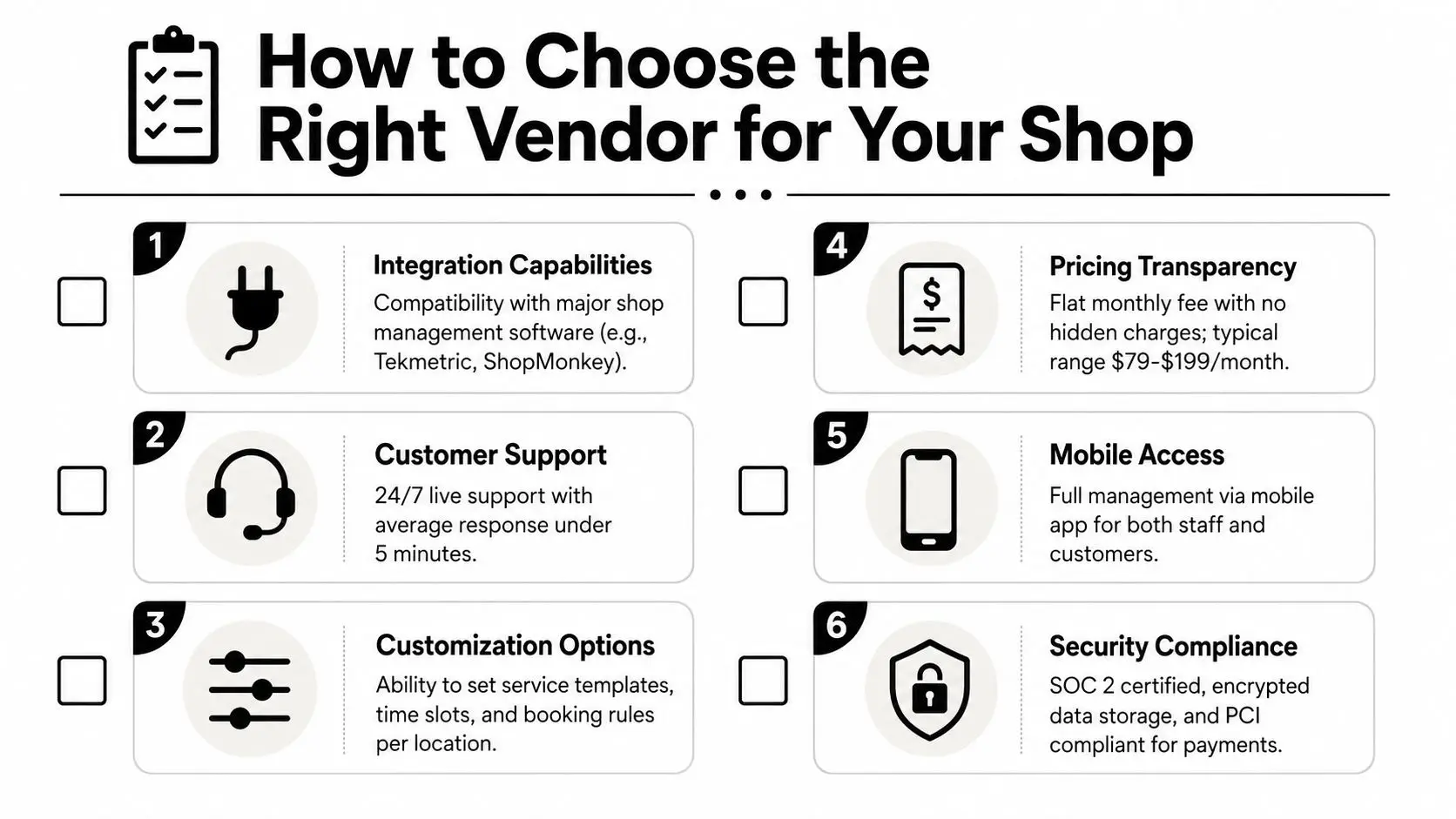
A pretty demo can still fail in a real shop. The vendor needs to prove it can handle multi-resource bookings, not just a single calendar slot with a name on it. If your day depends on bays, lifts, technicians, and timing windows all lining up, the software has to respect all of them at once.
Start by asking how the system handles overlap. If a repair runs long, does it replan intelligently or just push the problem into the next appointment? That one question reveals whether the platform is built for actual operations or for tidy-looking office workflows.
Questions that separate useful vendors from polished ones
- Multi-resource logic: Can the system book a job against a technician and a bay at the same time, or is it only calendar-first?
- Configurable rules: Can your team change constraints without calling a developer every time a job type changes?
- Data movement: What happens when you need to export customer, vehicle, and schedule data out of the platform?
- Support quality: What happens at 8 a.m. on a Saturday when the schedule breaks and you need a human, not a chatbot?
- Pricing mechanics: Does the price scale by user, location, booking volume, or every small change in setup?
- Implementation scope: How many onboarding hours are included, and what counts as extra?
Those questions matter more than feature lists because they expose the hidden cost of adoption. A cheap system that needs constant babysitting ends up costing more than a cleaner platform with better support. For a Whitby shop, that's especially true if you're running fleet work, collision timing, or protection installs alongside general repair.
The other commercial issue is contract structure. If the vendor won't give clear pricing terms, clear onboarding scope, and a realistic support promise, walk away. That's not a scheduling vendor, that's a future argument.
For shops that want to keep their customer communication tight once bookings start flowing, the Google Business Profile optimisation angle is worth aligning with the vendor demo, because your visibility and your booking process should reinforce each other.
The cleanest demo script is simple. Ask them to build a booking for a certified job, then add a bay restriction, then force a delay, then show the replan. If they can't explain each step without hand-waving, they're not ready for your shop.
Setting Up Your Automated Scheduling System Step by Step
The setup should begin with data, not software buttons. If your customer and vehicle history is a mess, every automation decision downstream will be shaky. Import the records you trust, clean the duplicates, and fix the technician profiles before you ever open the booking widget to customers.
Build the rule set before go-live
Map technician skills to job classes first. Then define bay capacity, tooling rules, working hours, and promised pickup windows. If you skip that sequence, the system will guess, and guessing is how you end up with valid-looking schedules that don't work in the bay.
Next, connect the customer-facing booking flow. That includes the website widget, the phone system, and any missed-call text-back setup you use. The point is to catch demand wherever it starts, then route it into the same schedule logic instead of letting each channel create its own version of the truth.
Operational truth: If your front desk, phone, and website all accept bookings differently, your schedule will drift almost immediately.
A practical rollout for a small four-bay shop should be phased. First, load data and rules. Second, test internal bookings only. Third, soft-launch with a narrow set of job types and only one or two customer channels. A larger operation can stretch that into more layers, but the order shouldn't change.
The implementation literature on scheduling systems is clear on a basic point, bad master data breaks the optimiser even if the software is sound (academic scheduling paper). That means stale certifications, wrong job durations, or hidden bay downtime will cause problems you'll later blame on the tool. Don't do that. Fix the data first.
The most common stall point is overly clever logic. Shops try to encode every exception on day one, then the rollout gets bogged down in edge cases. Keep the first version strict, honest, and easy to audit. Once the team trusts it, add more sophistication.
Training Your Team and Messaging Customers
The software doesn't fail first, the people do. That sounds harsh, but it's the truth I learned when the schedule stopped living in my head and started living in a system everybody could see. Advisors had to stop improvising around the edges, and techs had to start trusting the board instead of asking, “What am I doing next?”
How the rollout felt inside the shop
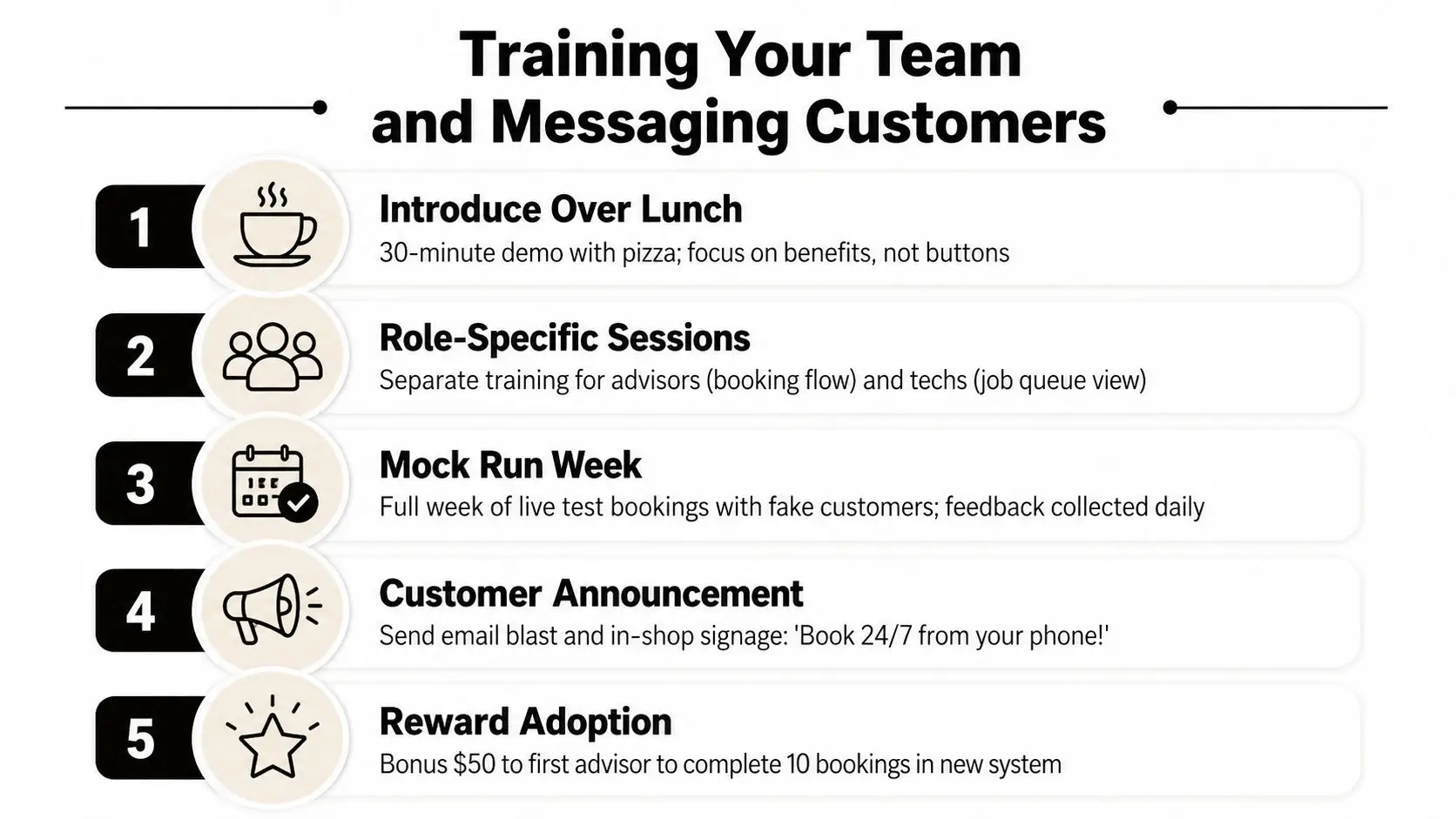
The first session should be short and practical. I'd do it over lunch, show the booking flow once, and focus on what changes for the advisor, not every menu in the software. The technician session should be separate, because techs don't need the same screen tour, they need to know where jobs appear, how delays get flagged, and what to do when the timeline shifts.
During the soft-launch week, expect friction. Someone will try to override the schedule because “that's how we've always done it”. Someone else will forget to update a part delay. That's normal, and if you don't plan for it, you'll assume the platform is the problem.
For customer messaging, keep it plain and local. Something like, “Thanks for booking with us. We've got your slot confirmed, and we'll send a reminder before your appointment.” That tone works because it sounds like a real shop, not a call centre.
A better no-show follow-up is just as direct. “We missed you today and your bay is now open. Reply here if you want to rebook.” The goal is to reopen the slot quickly, not start a policy debate.
The customer communication tools piece matters because the system only helps if the customer sees the message and trusts it. If reminders are too formal or too late, they get ignored. If they're clear and timely, they reduce the odds of a wasted appointment.
The strongest training move is also the simplest, reward adoption. Don't make the team guess whether the new workflow matters. Make it obvious, keep the first week light, and collect feedback every day before you lock the process.
Tracking Performance and Troubleshooting Issues
If the system is paying for itself, you'll see it in a few numbers, and you don't need a giant dashboard to catch the pattern. Review bay utilisation, technician utilisation, no-show rate, schedule override rate, and replan frequency every month. Those five metrics tell you whether the automation is working or whether the shop is just pretending to be organised.
What the numbers usually mean
A high override rate usually points to stale master data, not bad software. That's the first place to look if advisors keep fixing bookings by hand. Check technician certifications, bay downtime, and job duration estimates before you blame the vendor.
No-show spikes usually mean the customer messages are weak, mistimed, or not being delivered through the right channel. If reminders are correct but the issue remains, the booking promise itself may be too loose. People show up more reliably when the booking was specific and the next step was clear.
Replan frequency is the warning light for jobs that regularly run long. If you keep shifting the day around the same jobs, your duration estimates are fantasy and your schedule will keep breaking in the same places. Tighten those estimates before adding more automation on top.
Carmedics Autowerks Inc can also use a fleet maintenance manager mindset here, because repeatable servicing is easier to schedule when the service model is structured instead of improvised.
Troubleshooting without guessing
- Conflicts keep appearing: Recheck hard constraints first, then make sure the scheduler isn't being fed overlapping technician or bay availability.
- Customers book jobs you don't service: Tighten the service menu and remove vague categories.
- Reminders fire at the wrong time: Audit your communication rules and booking-window settings before touching anything else.
- Integrations fail: Test the handoff between the scheduler, CRM, and phone or text system with a live booking.
- Schedules look good but still collapse: Your input data is stale, usually in technician profiles or job-duration assumptions.
The second ninety days should be about refinement, not reinvention. Improve duration estimates, add smarter no-show handling if the patterns justify it, and tighten the soft rules only after the hard rules are stable. That's how you get a schedule that stays useful after the novelty wears off.
If you want a shop team that can handle the operational side of modern scheduling without hand-waving, visit Carmedics Autowerks Inc and talk to a team that works with real Whitby vehicle needs every day. If your current booking process is still living on a whiteboard, this is the time to tighten it up, protect your bays, and build a system your staff can trust.