


You're probably in one of two spots right now. You've either looked closely at a PPF install and noticed the tiny details overlooked by many, or you're trying to understand why one shop's work looks wrapped and refined while another looks merely covered.
That gap usually comes down to process. More specifically, it comes down to whether the shop is relying on hand trimming for everything or using a Paint Protection Film plotter as part of a disciplined installation workflow. In a market like Whitby and the GTA, where owners expect sharp fitment around lights, sensors, edges, and complex body lines, that difference shows up fast.
The Difference Between a Good and a Perfect PPF Job
A good PPF job protects the paint. A perfect one protects the paint and disappears.
An owner only notices a weak install when they catch an uneven edge near a headlight, a line that sits just a little too far from a panel edge, or a trimmed section that doesn't mirror the body shape quite right. Nothing may be technically “wrong,” but it doesn't look factory. On a new vehicle, that's enough to bother an owner every time the car is washed.
Hand cutting is where that risk enters the job. Even a steady installer has to manage blade pressure, body contour, awkward panel angles, and customer paint sitting directly under the knife. That's a lot of variables for something that's supposed to look invisible.
A Paint Protection Film plotter changes that. Instead of shaping raw film directly on the vehicle, the plotter cuts a digitally prepared pattern before installation starts. The installer still has to position, stretch, anchor, and finish the film correctly, but the edge geometry is already organised.
Where perfection shows up
The biggest visual gains tend to appear in the places owners inspect first:
- Around headlights and grilles: Tight, consistent margins look deliberate.
- On mirror caps and bumper corners: Clean pattern design reduces improvised trimming.
- At panel transitions: Matching left and right sides matters more than people think.
- Near badges and sensors: Pre-cut patterns lower the chance of risky knife work on paint.
A strong install often goes unnoticed. A weak edge gets noticed every time.
This is why modern pre-cut work has become such a major part of high-end protection. If you're comparing options for a vehicle and want to see how this level of finish fits into a broader protection package, it helps to review a dedicated paint protection film service and look at how coverage areas are planned.
Good enough vs exact
“Good enough” usually means the installer corrected small pattern problems on the fly. “Exact” means the workflow was built to avoid those corrections in the first place.
This defines the machine's key benefit. It's not replacing installer skill. It's removing avoidable inconsistency so the installer can focus on alignment, tension control, edge wrapping, and final finish.
What Is a PPF Plotter and How Does It Work
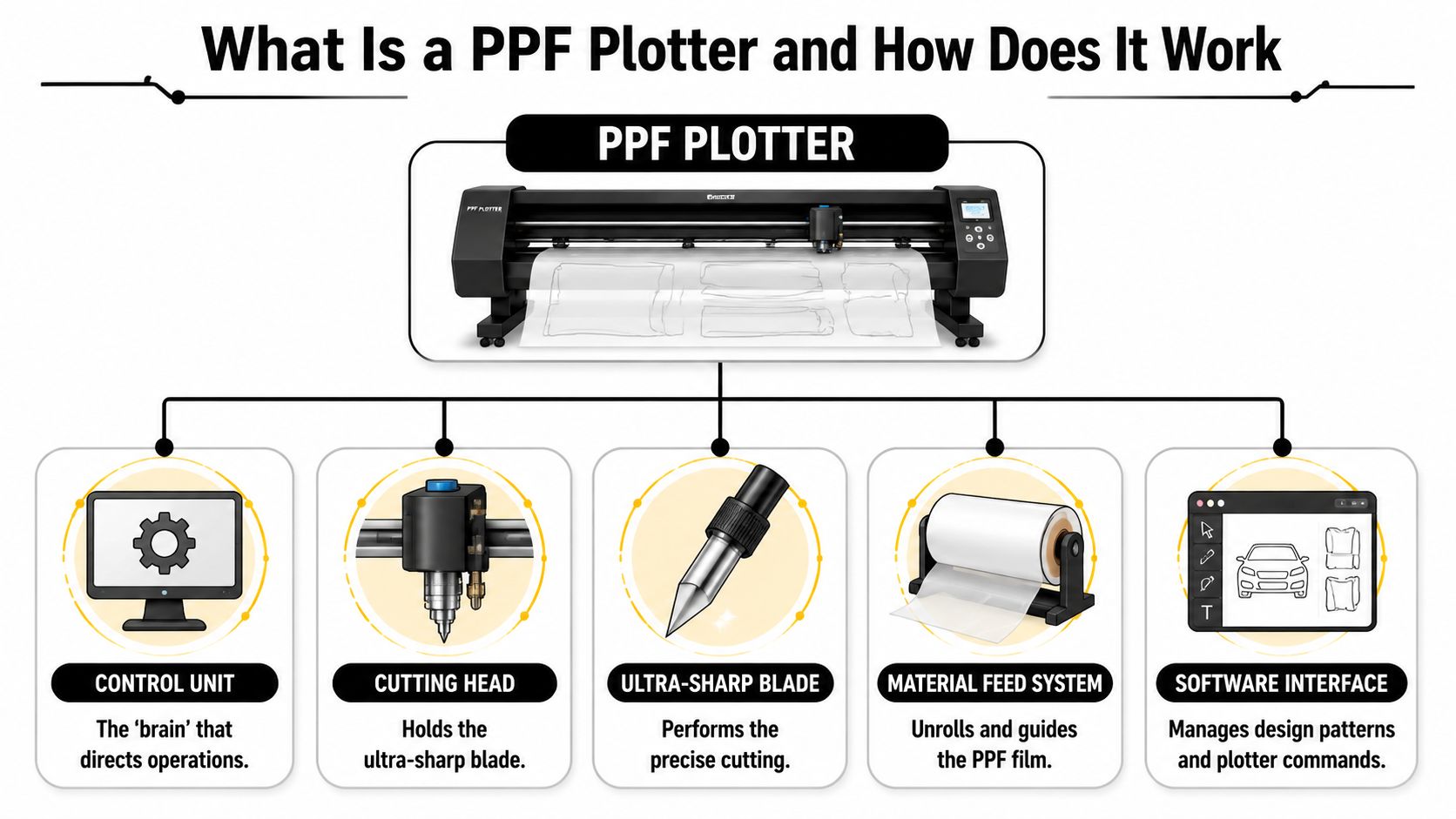
A PPF plotter is easiest to understand as a high-precision printer that uses a blade instead of ink.
You load a roll of paint protection film into the machine. The software sends a cut file for a specific panel, such as a hood, fender, or bumper section. The plotter feeds the material forward, tracks it through rollers, and moves the cutting head across the film to create the exact shape needed for installation.
That simple description hides a lot of precision. If the feed slips, the cut wanders. If the blade holder flexes, corners lose definition. If the carriage movement isn't smooth, the edge quality suffers.
The core parts that matter
A professional machine has a few key systems working together:
- Control unit: This is the machine's brain. It receives the pattern data and controls movement, speed, and cut execution.
- Material feed system: Rollers grip the film and advance it evenly. If this part isn't stable, long cuts drift.
- Cutting head: The carriage moves side to side and carries the blade holder with controlled pressure.
- Blade holder and blade: Edge quality is won or lost here. The blade must rotate freely and track curves cleanly.
- Software interface: The operator selects patterns, nests parts, mirrors layouts when needed, and sends the final job.
What the machine is actually doing
In practice, the workflow feels closer to garment cutting than hand trimming a car. You're producing a custom-fit piece first, then applying it.
The sequence looks like this:
- Load the film roll so it tracks straight through the machine.
- Call up the vehicle pattern in the cutting software.
- Choose the panel set required for the job.
- Send the file to the plotter.
- Cut the kit and remove the excess film.
- Bring the prepared piece to the vehicle for installation.
The plotter doesn't install the film. It gives the installer a cleaner starting point.
Why that matters in a Canadian shop
In a busy Canadian shop, repeatability matters as much as raw cutting ability. Vehicles come in with different front-end shapes, trim packages, sensor layouts, and owner expectations. A plotter gives the shop a way to keep fitment consistent from one job to the next, especially when customers expect premium workmanship rather than “close enough.”
The Brains Behind the Blade PPF Software and File Formats
The hardware gets attention because it's visible. The software is what makes the machine useful.
Without proper pattern software, a plotter is just a motorised cutting platform. It still moves. It still cuts. But it has no reliable understanding of where a hood curve ends, where a sensor opening belongs, or how a mirror cap should be segmented so the installer can lay it without fighting the shape.
Why software matters more than beginners think
Professional installers don't want to sketch patterns from scratch on every vehicle. That wastes time and introduces inconsistency. Instead, they work from digital templates built for specific makes, models, trims, and panel types.
These files are typically vector-based patterns. That matters because vector lines stay precise when scaled, rotated, mirrored, or adjusted. For a cutter, clean vector geometry is the difference between a smooth edge and a file that produces awkward points or poor transitions.
A strong pattern library also reduces knife work on the vehicle. If the pattern already accounts for a badge recess, washer cover, parking sensor area, or tight radius near a grille opening, the installer can focus on fitment rather than trimming around paint.
Good software does more than store patterns
The best systems help the installer make practical decisions before the cut starts:
- Panel selection: You may choose a full panel, a partial section, or a custom layout depending on the package.
- Variant matching: Trim changes can affect fitment around spoilers, cameras, or front fascia details.
- Pattern adjustment: Installers often prefer slight changes in edge behaviour based on technique and film style.
- Cut planning: Nesting and orientation affect workflow at the install bench.
File quality shows up on the car
If a pattern is weak, the installer pays for it later. A corner lands short. A relief cut opens where it shouldn't. A wrap edge doesn't give enough material to anchor properly. Then the job becomes half digital and half improvisation.
A plotter cut only looks professional if the file behind it was built professionally.
That's why experienced shops judge software by pattern reliability, update quality, and how well the files behave during real installation, not just how many vehicle names appear in a menu. A large database sounds impressive, but what matters is whether the pattern fits the panel the way an installer needs it to fit.
Choosing Your Weapon Vinyl Cutters vs True PPF Plotters
A lot of newcomers look at a lower-cost vinyl cutter and think it'll handle PPF well enough. Sometimes it will cut something. That's not the same as cutting it properly.
Window tint, sign vinyl, and paint protection film don't ask the same things from a machine. PPF is thicker, tougher, and less forgiving when the blade setup is wrong. A machine that works for lighter film can become a headache when you feed it expensive urethane and expect crisp edges.
The clearest proof is in the cutting requirements. For high-yield PPF cutting requiring optical registration, professional plotters must be equipped with ≥300 g cutting force and support 45°/60° blade angles to prevent material tearing and maintain clean edges on 0.1 mm-thick urethane films, as noted in this film plotter buying guide.
Where standard vinyl cutters fall short
A basic vinyl cutter may seem acceptable on a short, simple panel. Problems usually show up on longer cuts, tighter curves, or thicker film constructions.
Common failures include:
- Inconsistent depth: The film isn't fully cut in one area, then gets overcut in another.
- Tracking drift: Long panel pieces don't stay square through the machine.
- Poor edge quality: Curves look rough, especially around small radii.
- Material stress: The film drags, bunches, or tears instead of releasing cleanly.
If you've ever compared finishing systems in another trade, the logic is similar to choosing the right substrate system instead of forcing one product to do every job. This expert guide to epoxy finishes explains that kind of tool-to-task distinction well, even though it's from a different field.
A direct comparison
| Specification | Standard Vinyl Cutter | Dedicated PPF Plotter |
|---|---|---|
| Intended material focus | Thin vinyl and lighter films | Thicker urethane-based PPF |
| Cutting force capacity | Often limited for demanding PPF work | Built for higher-force cutting demands |
| Blade support | May handle basic angles | Better suited for 45° and 60° blade use |
| Material tracking | Adequate for lighter rolls | More stable for heavy, costly film rolls |
| Edge consistency | More likely to struggle on complex cuts | More reliable on long and detailed patterns |
| Waste risk | Higher when settings or feed are marginal | Lower when calibrated correctly |
| Professional scalability | Restrictive | Better fit for repeatable production |
False economy is still expensive
The cheaper machine can cost more once you count wasted film, recuts, slower output, and install frustration. That's before you factor in customer perception. Owners paying for premium paint protection notice crooked margins and rough panel behaviour.
For anyone comparing protection methods and installation standards, a broader look at the best car paint protection options helps put the machine choice in context. The cutting system affects the final result more than many buyers realise.
If the machine can't track thick film cleanly, the installer ends up fixing machine problems by hand.
A real PPF operation needs a real PPF cutter. That's not overspending. That's avoiding predictable rework.
From Box to Bumper Setup Calibration and Workflow
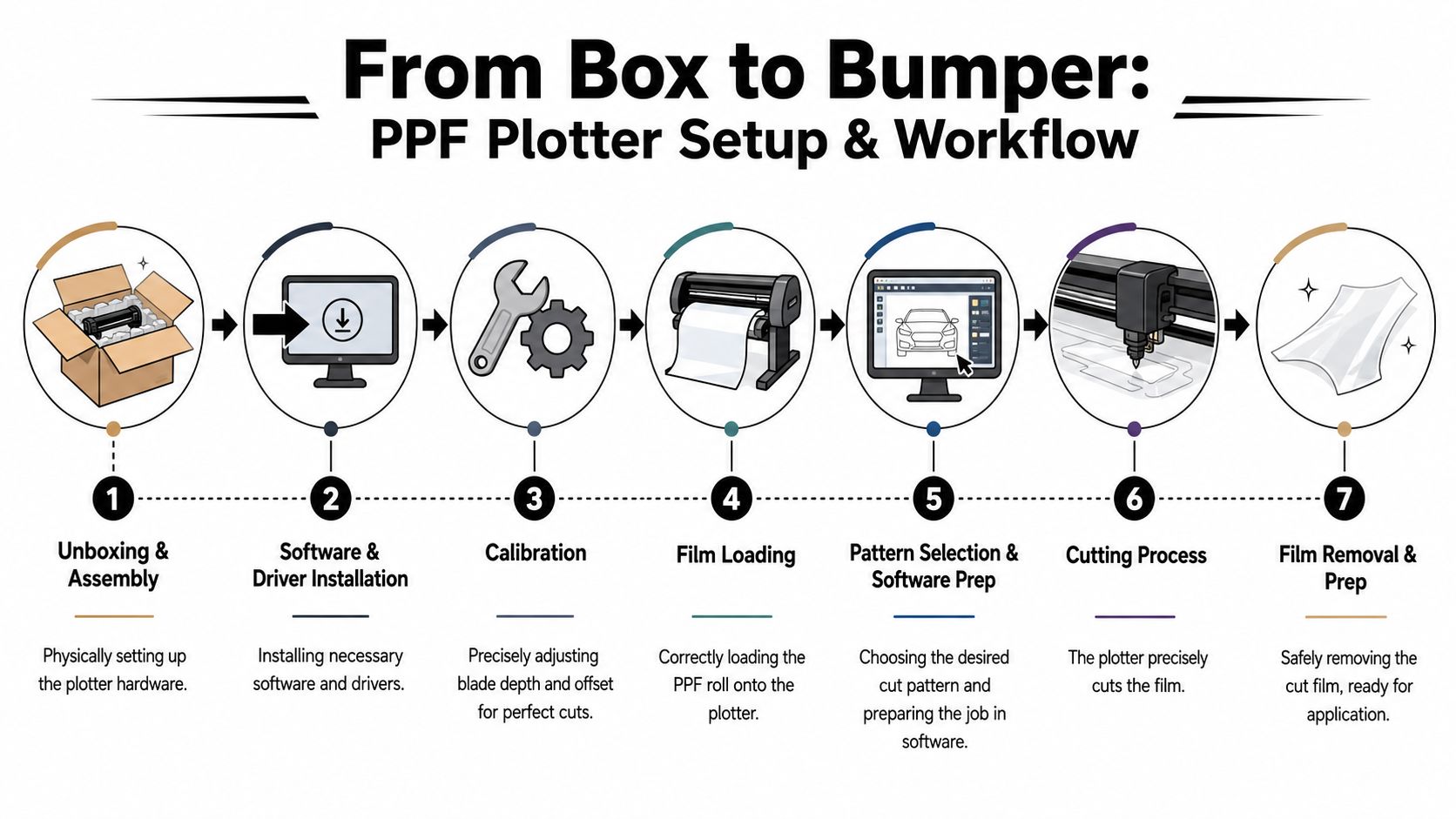
A new plotter shows its true value on a busy install day, not on delivery day. Its true test is whether it can cut a clean, usable hood or bumper kit without forcing the installer to correct machine mistakes by hand. In a Whitby or GTA shop, where owners expect tight edges and repeatable fitment on premium vehicles, setup discipline matters as much as the machine itself.
Calibration comes before production
Factory presets are only a starting point. PPF thickness, liner construction, top coat behaviour, blade wear, and even shop temperature can change how a pattern cuts and weeds.
A proper test cut saves film.
For plotted PPF, installers commonly use a 60° blade and significantly more downforce than they would for window tint. Apeax explains the distinction in its PPF vs tint plotter blade guide, including the typical PPF cutting-force range of 150 to 250 grams versus 50 to 100 grams for tint. Those numbers are useful as a baseline, not a rule that overrides what the film in front of you is doing.
What to set first
Start with the mechanical basics before touching production files:
Blade depth
Set the blade as shallow as possible while still getting a clean cut through the film face. If the liner is heavily scored, blade exposure is usually too aggressive.Blade angle
Match the blade to the material. PPF needs a blade geometry that can hold detail through thicker urethane, especially on tight corners and relief cuts.Cutting force
Increase pressure in small steps. Too little force leaves tabs attached. Too much force creates rough edges, increases liner damage, and can make weeding feel harder instead of easier.Film alignment
Load the roll square and confirm the pinch rollers are seated correctly. A minor tracking error on the first foot becomes a major fitment problem by the end of a long rocker or hood pattern.Test cut review
Weed a small shape by hand and inspect the edge. Clean release, smooth curves, and an intact liner usually tell you the machine is close.
One rule holds up in every shop. If weeding feels like a fight, stop and recalibrate.
The workflow that keeps installs clean
A reliable plotter workflow is less about speed than control. In our shop, the best results come from treating the cutting bench as part of the install, not as a separate task someone rushes through.
The sequence is straightforward:
- Open the correct vehicle pattern and confirm trim level, year, and panel version.
- Load the film and square the roll before sending any job.
- Watch the first movement of the cut to catch tracking issues early.
- Weed carefully so the finished panel stays free of dirt, folds, and stretched sections.
- Lay out pieces in install order so the installer is not sorting patterns with adhesive exposed.
That last step gets overlooked by new shops. It matters. Once a piece is cut, every extra touch is another chance to contaminate adhesive, crease an edge, or mix up left and right panels. A controlled bench setup inside a dedicated Whitby auto protection and installation facility makes the whole process more repeatable.
Where setups usually go wrong
The common mistakes are predictable. Installers copy tint settings onto PPF, leave too much blade exposed, skip the test cut, or assume one brand of film will behave like the next.
That approach gets expensive fast in a Canadian shop, where material cost, labour time, and customer expectations all run high. A plotter should reduce variation. Poor calibration does the opposite, and the installer ends up solving machine problems on the car.
The Business Case Plotter Cost and ROI for Installers
A Whitby or GTA shop feels plotter economics on a busy week, not on a spreadsheet. Two front-end packages, one partial, one full clip, and a couple of edge replacements can expose every weakness in a manual workflow. If the cuts are inconsistent or the bench gets backed up, profit disappears into recuts, extra labour, and delivery delays.
A professional PPF cutter system typically costs $5,000 to $10,000, and many shops start with a 30-inch machine for common PPF work, while wider panels can push the need for a 60-inch cutter, according to Roland DGA's discussion of film cutter and plotter technologies.
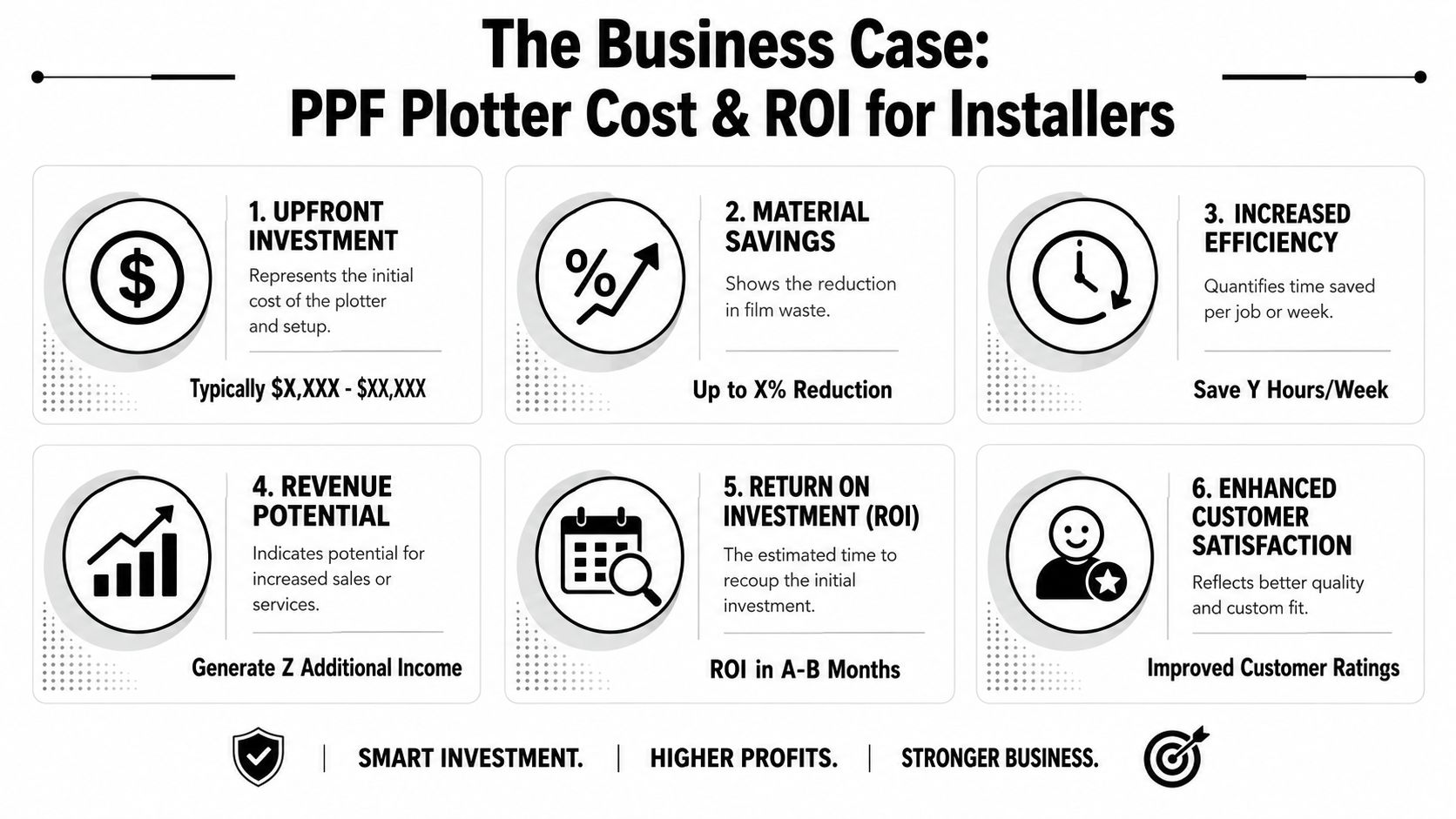
The return rarely comes from cutting a few minutes off one install. It comes from making the whole shop easier to run at a high standard.
Here is where a plotter usually pays for itself in real shop conditions:
- Lower material waste: Fewer bad hand cuts and fewer panels remade because a knife line drifted.
- More predictable labour: Prep becomes scheduled bench work instead of on-car problem solving.
- Better quality control: Different installers can produce a closer match in edge placement and panel shape.
- Cleaner pricing confidence: Shops can quote premium work more comfortably when the process is repeatable.
Roland DGA also notes that shops running steady volume can recover that equipment cost quickly. Those projections should be treated carefully. They depend on car count, package mix, software subscription costs, staff skill, and local labour rates. In the GTA, where customer expectations are high and rework is expensive, the stronger argument is consistency. A plotter helps a shop deliver the same standard on Monday morning and Friday afternoon.
That matters more than many new installers expect.
Manual trimming can look cheaper until the hidden costs show up. A missed line on a hood kit, an extra half hour fixing an overcut edge, or a contaminated panel that has to be remade can erase the margin from a job fast. In a Canadian market where film, rent, and skilled labour all cost real money, reducing variation is part of the ROI.
There is also a customer-facing side to this. Clients may never see the cutter, but they notice cleaner edges, better symmetry, and fewer signs that a panel was forced into place. If you want to understand how that process connects to retail pricing, compare paint protection film cost and what shapes that price with the labour and equipment behind a proper install.
For installers, the business case is simple. A plotter does not replace skill. It makes skilled work more repeatable, easier to price, and easier to scale without letting quality slip.
Keeping Your Plotter Sharp Maintenance and Troubleshooting
A plotter can be reliable for a long time if the operator treats it like precision equipment instead of a disposable production tool.
Most cutting issues don't start with the software. They start with maintenance that was skipped. Dirty rollers lose grip. Worn blades drag through film instead of slicing it. A tired cutting strip makes clean geometry impossible, even when the file is perfect.
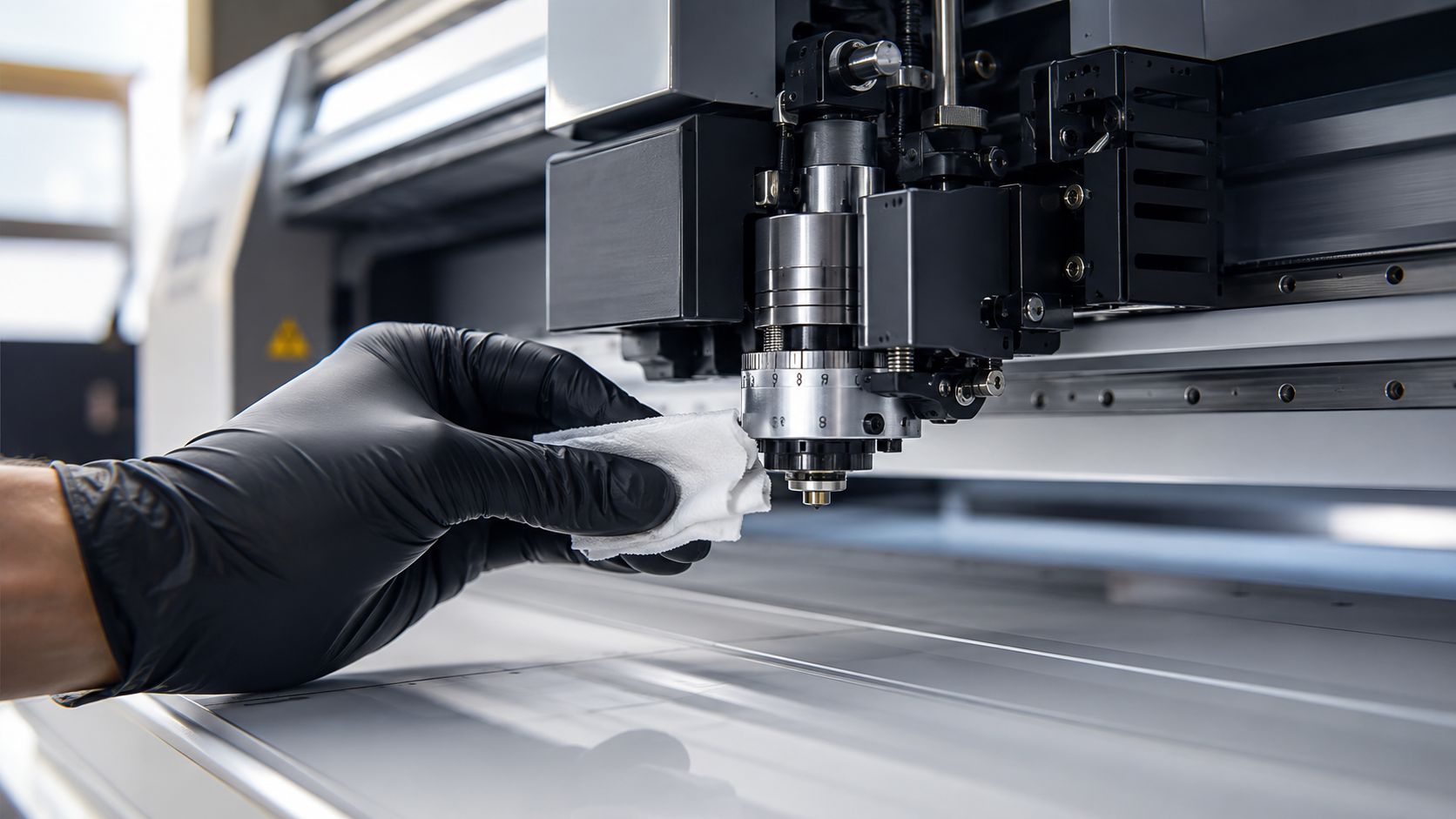
What to stay on top of
Keep the routine simple and consistent:
- Clean the rollers: Dust, adhesive residue, and film debris reduce tracking accuracy.
- Inspect the blade: Replace it when cuts stop feeling crisp during weeding.
- Check the cutting strip: If edges start looking ragged, the strip may be part of the problem.
- Verify alignment: Don't assume the film roll is loading square just because it looks close.
Fast troubleshooting
When a cut goes wrong, match the symptom to the likely cause.
| Problem | Likely cause |
|---|---|
| Film doesn't weed cleanly | Blade depth or cutting force needs adjustment |
| Jagged edges on curves | Blade is worn, dirty, or not rotating freely |
| Tearing during removal | Wrong setup or damaged cutting path |
| Long patterns drift | Roller pressure or material alignment issue |
| Backing gets marked heavily | Blade exposure is too aggressive |
Clean cuts come from small habits repeated daily, not from one perfect setup done months ago.
The same discipline applies after installation. Film performance depends on material quality, prep, installation, and aftercare. If you want to understand the longer view from the owner side, this guide on how long PPF lasts is useful context.
If you want a PPF installation done with the kind of precision that starts long before the film touches the vehicle, Carmedics Autowerks Inc in Whitby offers professional paint protection film, tint, repair, and vehicle protection services for drivers who care about clean fitment, durable results, and workmanship that holds up under close inspection.